ZSCMON aggregated SCMON view

The SAP tool for ABAP system usage SCMON is great. The problem is that the data is a lot to digest. The SUSG function can aggregate the data, but that is difficult to view.

The below Z program is simply taking the SCMON data and is providing a summarized view.

Transaction ZSCMON and program ZSCMON

Create a program ZSCMON and assign transaction code ZSCMON as well.

Report code:

REPORT zscmon.

CONSTANTS : zgc_tcode TYPE tcode VALUE 'ZSCMON',
            zgc_col   TYPE lvc_fname  VALUE 'NUMBEROFCALLS'.

DATA: zgv_objtyp TYPE trobjtype,
      zgv_objnme TYPE sobj_name,
      zgv_clsnme TYPE scmon_classname.


PARAMETERS: zp_stdat TYPE scmon_slicestartdate,
            zp_eddat TYPE scmon_sliceenddate.

SELECT-OPTIONS: zs_obtyp FOR zgv_objtyp,
                zs_obnme FOR zgv_objnme,
                zs_clsnm FOR zgv_clsnme.

PARAMETERS: zp_sum  RADIOBUTTON GROUP g1 DEFAULT 'X',
            zp_det  RADIOBUTTON GROUP g1.

INITIALIZATION.
* AUTHORITY CHECK for TCODE
  CALL FUNCTION 'AUTHORITY_CHECK_TCODE'
    EXPORTING
      tcode  = zgc_tcode
    EXCEPTIONS
      ok     = 0
      not_ok = 2
      OTHERS = 3.
  IF sy-subrc <> 0.
    MESSAGE e172(00) WITH zgc_tcode.
  ENDIF.

AT SELECTION-SCREEN.
  IF zp_eddat LT zp_stdat.
    MESSAGE TEXT-001 TYPE 'E'.      
"Slice End Date cannot be less that Slice Start Date
  ENDIF.

START-OF-SELECTION.

  IF zp_det EQ abap_true.
    SELECT object,
           obj_name,
           proctype,
           procname,
           classname,
           SUM( counter ) AS numberofcalls
              FROM scmon_vdata INTO TABLE @DATA(zgt_scmond)
              WHERE slicestart  GE @zp_stdat
                AND sliceend    LE @zp_eddat
                AND object      IN @zs_obtyp[]
                AND obj_name    IN @zs_obnme[]
                AND classname   IN @zs_clsnm[]
              GROUP BY object, obj_name, proctype, procname, classname.

*ALV Object
    cl_salv_table=>factory(
           IMPORTING r_salv_table = DATA(zgo_alv)
           CHANGING  t_table      = zgt_scmond ).

  ELSEIF zp_sum EQ abap_true.
    SELECT object,
           obj_name,
           SUM( counter ) AS numberofcalls
              FROM scmon_vdata INTO TABLE @DATA(zgt_scmons)
              WHERE slicestart  GE @zp_stdat
                AND sliceend    LE @zp_eddat
                AND object      IN @zs_obtyp[]
                AND obj_name    IN @zs_obnme[]
              GROUP BY object, obj_name.      

*  ALV Object
    cl_salv_table=>factory(
           IMPORTING r_salv_table = zgo_alv
           CHANGING  t_table      = zgt_scmons ).

  ENDIF.

*Set functions, zebra pattern, column width optimization
  zgo_alv->get_functions(
           )->set_all( ).
  zgo_alv->get_display_settings(
           )->set_striped_pattern( value = abap_true ).
  DATA(zgo_alv_cols) = zgo_alv->get_columns( ).
  zgo_alv_cols->set_optimize( ).

* modify individual properties
  TRY.
      DATA(zgo_col) = zgo_alv_cols->get_column( zgc_col ).
      zgo_col->set_long_text( TEXT-002 ).               
      zgo_col->set_medium_text( TEXT-002 ).            
      zgo_col->set_short_text( TEXT-002 ).              
    CATCH cx_salv_not_found.                           
  ENDTRY.

* ALV DISPLAY
  zgo_alv->display( ).

Text symbols:

001 Slice End Date cannot be less that Slice Start Date
002 NoOfCalls
003 Not authorized to access ABAP call monitor data

Selection texts:

ZP_DET Detail
ZP_EDDAT Slice End Date
ZP_STDAT Slice Start Date
ZP_SUM Summary
ZS_CLSNM Called Class Name
ZS_OBNME Object Name
ZS_OBTYP Object Type

Running the transaction ZSCMON

Now run the program or transaction ZSCMON:
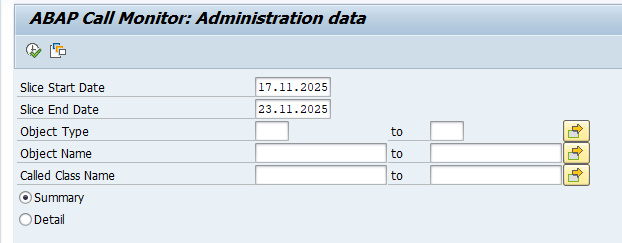
Fill out the correct data for the slice Start and End date.

Result:
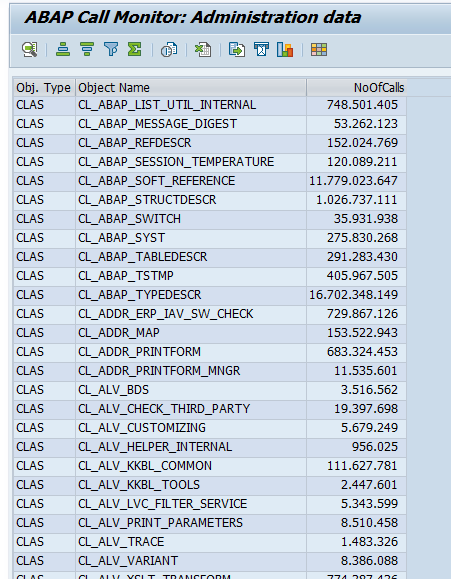
Run the program in detail mode if you still want to list the details.

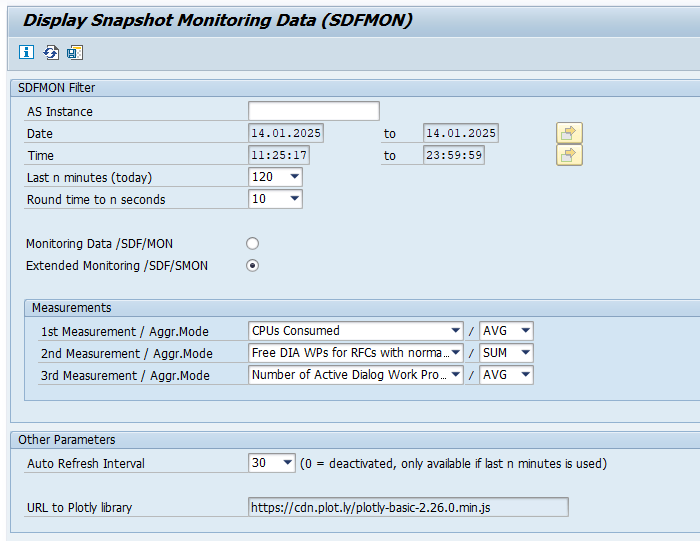
/SDF/SMON_DISPLAY to display snapshot monitoring data

The snapshot monitor tool is capturing a lot of good data. Displaying it can be bit harder. Here is where the /SDF/SMON_DISPLAY is helping.

Generic OSS note for this display is: 3210905 – Display Snapshot Monitor Data.

Setting link to plotly upfront

Before /SDF/SMON_DISPALY is working, you have to set a link to the plotly library. You can do this for all users, or for your personal user by setting a SU3 parameter:

Using /SDF/SMON_DISPLAY

Simply start transaction /SDF/SMON_DISPLAY:

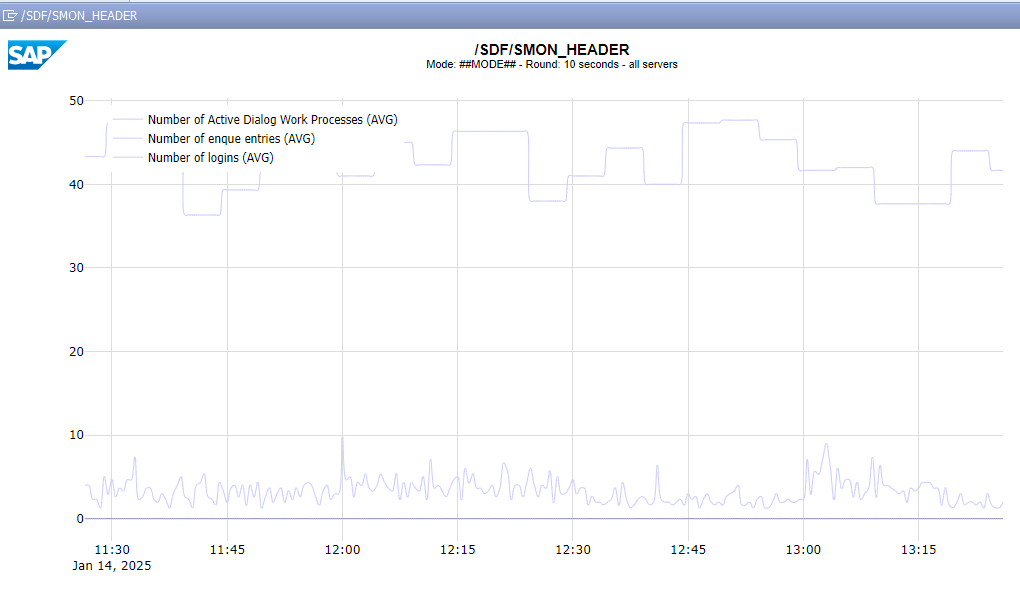
Fill out the measurements you want to see. And the last n minutes. Automatically the results are shown in a separate window:

Extra enhanced functions

Extra functions are released in new OSS notes:

System usage: SCMON ABAP call monitor

For several use cases you might need to get a more detailed insight into your SAP system. One of the tools is ST03N (read more about it in this blog), but it focuses on transactions. If you need more details on the calling ABAP coding, the SCMON tool might be a better solution. SCMON is the successor of the UPL tool (Usage and Procedure Logging).

Questions that will be answered in this blog are:

  • How to switch on SCMON tool?
  • How to use the results of the SCMON tool?
  • How can I find back from a piece of code to where it is actually used in a transaction, RFC call, ODATA call, etc?
  • What is the impact of the SCMON tool on system performance?

Activation of SCMON

The minimum requirements of SCMON are described formally in OSS notes 1828848 – Usage & Procedure Logging and ABAP Call Monitor: Technical prerequisite (UPL/SCMON) and 2679723 – ABAP Call Monitor, but basically it is available on any supported modern ABAP stack.

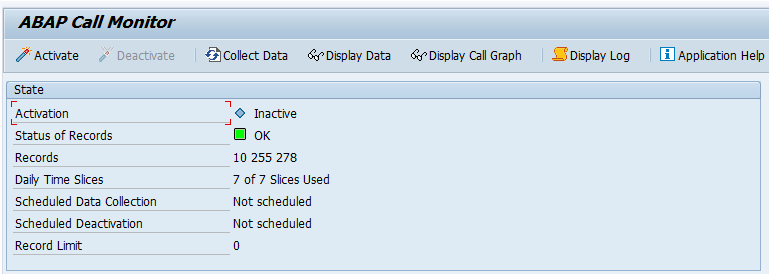
Start transaction SCMON:

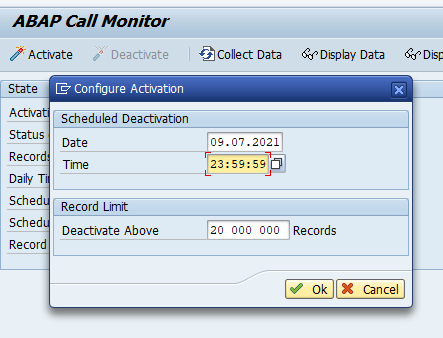
Press the activate button and set the end time settings for the SCMON monitor:

Use of SCMON data

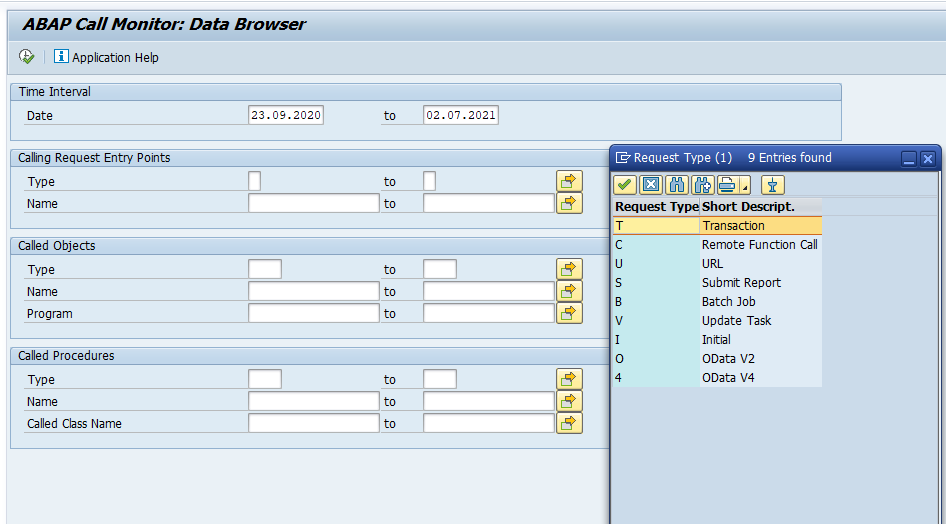
If data is gathered you can already use the results, or you can wait until the data collection time is completed. To display the data start transaction SCMON and hit the Display Data button:

Here you can already see a benefit over ST03N: you can select request type batch jobs, URL, ODATA call, or RFC call next to transaction.

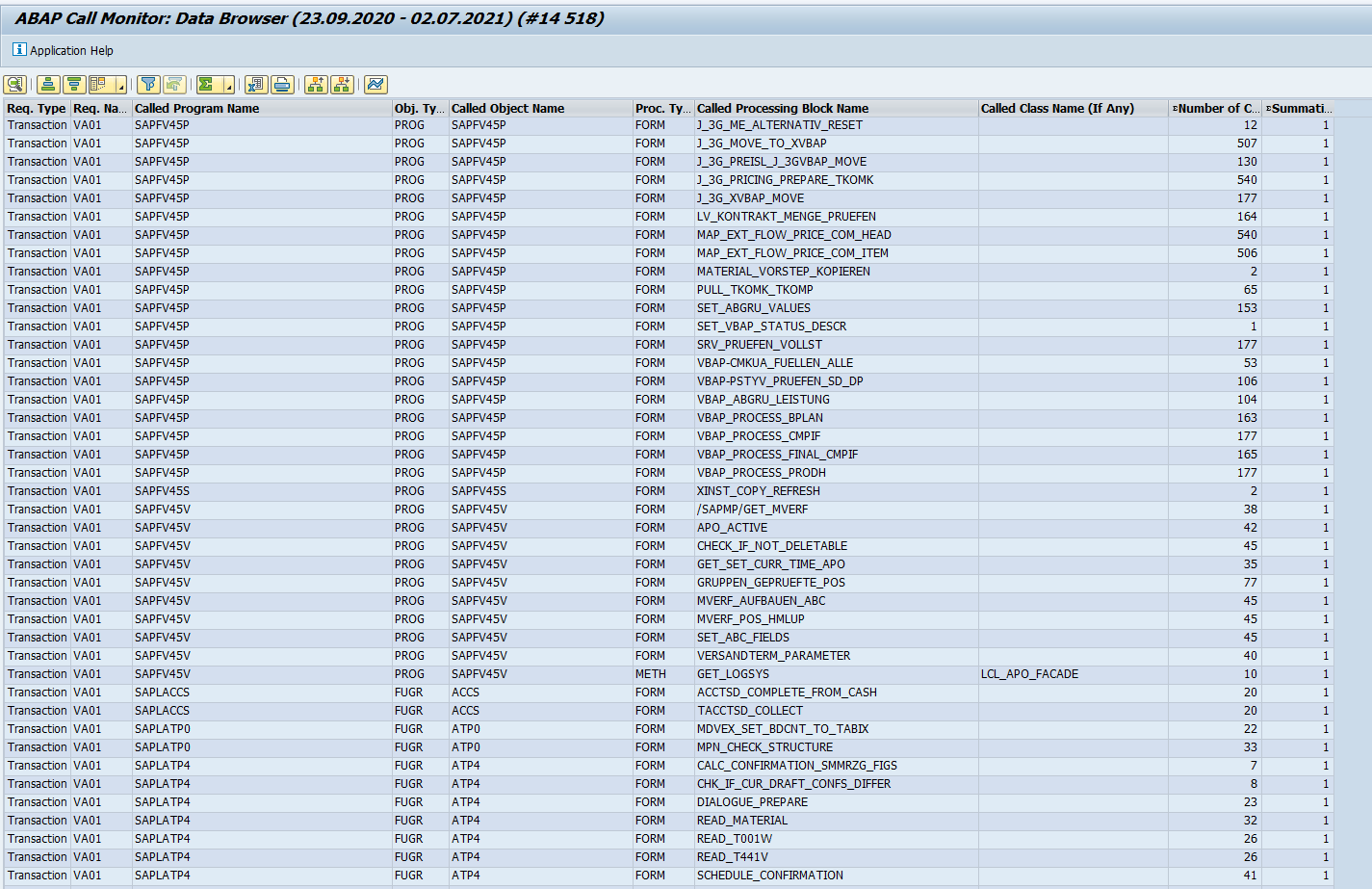
As example we show the result of transaction VA01:

Now you can see in very much detail which ABAP points are called for VA01.

You can also use it the other way around. Suppose we apply an OSS note to class CL_UKM_BUPA_FACTORY and want to determine the impact. If we do a where used list in SE24 on this class we get 134 new calling points and we don’t even know which ones are used.

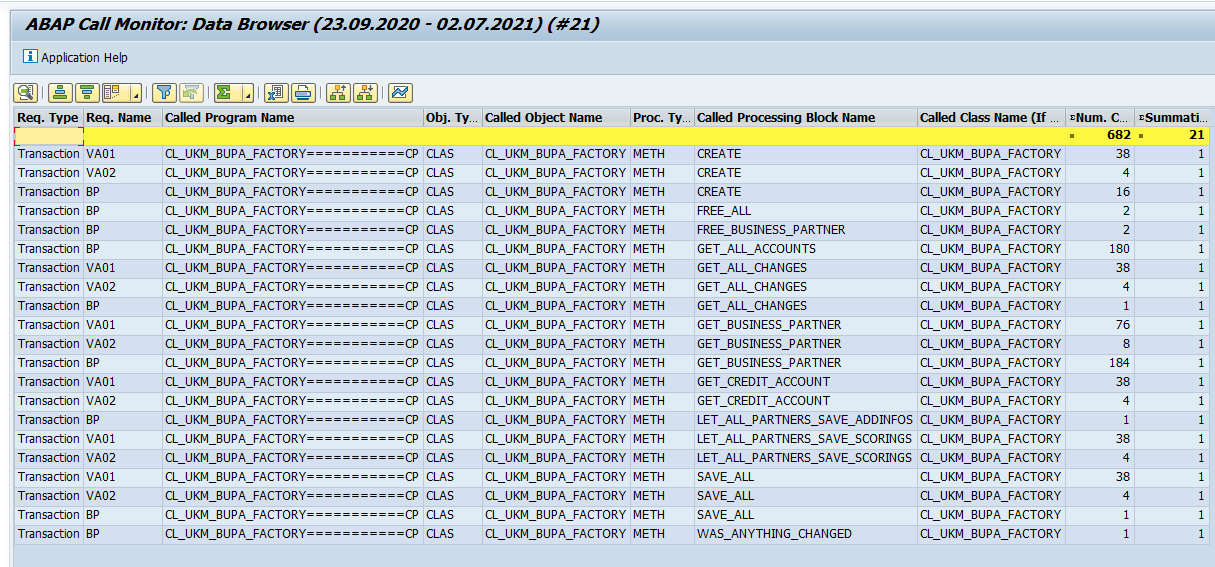
If we input CL_UKM_BUPA_FACTORY in the CLASS field and search for it, we get this result:

Now you can see that in our system the transactions VA01, VA02 and BP are using this class. Those need to be tested.

This is the big advantage of SCMON: it only takes used code and the code is related back to the start point which you can relate to, like a transaction, batch job, ODATA call, etc.

Performance of SCMON

If you worry about SCMON performance on your production system, it is about the same load as the old UPL. There is a parameter to fine tune performance described in OSS note 2657522 – New profile parameter and improvements for ABAP call monitor.

The exact impact of SCMON on performance is clearly described in OSS note 3098211 – Memory and performance requirements of the ABAP Call Monitor.

Condensing data with SUSG

With transaction SUSG the SCMON data can be condensed. Read more about it in this blog.

SAP background

Background of SCMON can be found in this SAP blog.

Bug fix OSS notes

Bug fix OSS notes that might be relevant for you: